
Networking and Firewall Exceptions
- Last Updated 10/7/2021, 6:38:43 AM UTC
- About 3 min read
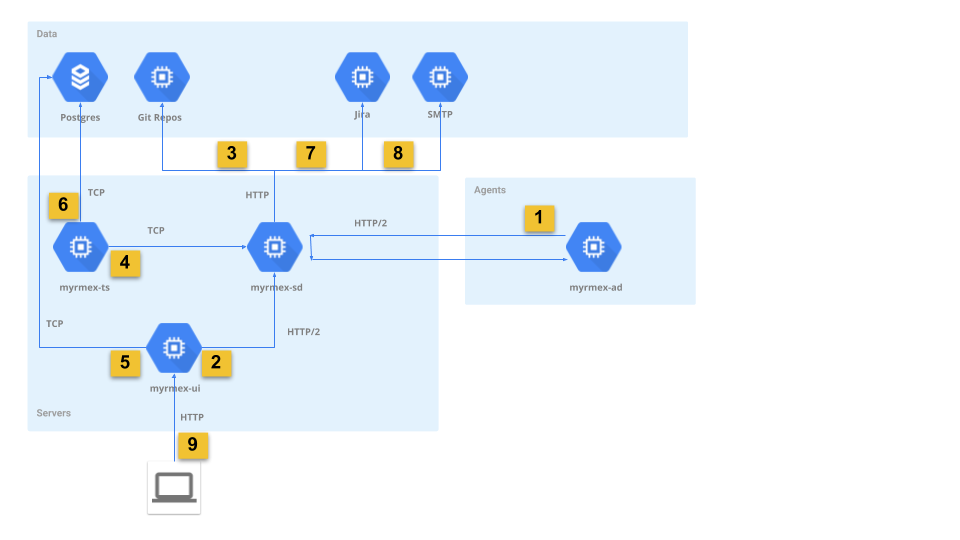
- Agent sends telemetry, events, status, alerts to controller and receives commands
- UI delegates commands to agents through controller
- Controller pulls configurations and plugins from
gitrepos - Time series server consumes telemetry and alerts from agents via controller
- Reporting and dashboarding queries
- Time series server persists telemetry and alerts to database
- Jira Notifications
- SMTP notifications
- Web UI client
# Firewall Rules
Firewall configuration requirements depend on the installation locations of the various myrmex components. The rules described below are provided for completeness; not all rules may require enabling. The addresses and port numbers are defined at configuration time, as such the rules refer to them by configuration parameter name.
# Inbound Rules
| Component | Address | Port | Protocol | Description | Network Diagram Path |
|---|---|---|---|---|---|
| myrmex-sd | agent_listen_addr | agent_listen_addr, default 9855 | HTTP/2 | Remote agents to controller connection | 1 |
| myrmex-sd | admin_listen_addr | admin_listen_addr, default 9856 | HTTP/2 | Administration interface | 2 |
| myrmex-sd | ipc.host | ipc.port, default 4224 | TCP | Telemetry queue | 4 |
| postgres | default 5432 | TCP | Postgres server | 5, 6 | |
| git repos | defaults 80, 443 | HTTP | Git over HTTP | 3 | |
| myrmex-ui | defaults 80, 443 | HTTP | Web UI | 9 |
# Outbound Rules
| Component | Remote Address | Remote Port | Protocol | Description | Network Diagram Path |
|---|---|---|---|---|---|
| myrmex-sd | catalog.git_repo | catalog.git_repo, defaults 80, 443 | HTTP | Remote git repos | 3 |
| myrmex-sd | jira.host | jira.port, defaults 80, 443 | HTTP | Jira REST API | 7 |
| myrmex-sd | smtp.host | smtp.port | SMTP | SMTP notifications | 8 |
| myrmex-ad | agent_server_addr | agent_server_addr, default 9855 | HTTP/2 | Agent to controller | 1 |
| myrmex-ts | default 5432 | TCP | Postgres server | 6 | |
| myrmex-ts | nats_url | nats_url, default 4224 | TCP | Telemetry queue | 4 |
| myrmex-ui | default 5432 | TCP | Postgres server | 5 | |
| myrmex-ui | myrmex.host | myrmex.port, default 9856 | HTTP/2 | Administration interface | 5 |
# Configuring firewalls
Remember that rule order is significant, ensure that when adding a rule it has higher priority to any other rules that would have otherwise rejected traffic allowed by it.
For example, in the below iptable, the rule allowing inbound traffic for agent_listen_addr should have higher priority to
rule #6 which rejects traffic from this port.
$ sudo iptables -L -v --line-numbers
Chain INPUT (policy ACCEPT)
num  target     prot opt source               destination
1    ACCEPT     all  --  anywhere             anywhere             state RELATED,ESTABLISHED
2    ACCEPT     icmp --  anywhere             anywhere
3    ACCEPT     all  --  anywhere             anywhere
4    ACCEPT     udp  --  anywhere             anywhere             udp spt:ntp
5    ACCEPT     tcp  --  anywhere             anywhere             state NEW tcp dpt:ssh
6    REJECT     all  --  anywhere             anywhere             reject-with icmp-host-prohibited
Check what type of firewall you are running:
# iptables service
sudo systemctl status iptables

# firewalld
sudo firewall-cmd --state
sudo systemctl status firewalld

# uncomplicated firewall
sudo ufw status
sudo systemctl status ufw
Assuming agent_listen_addr port is 9855, you would add it to the above iptable at position 6: